Intel Core i5-12500 Hackintosh with Gigabyte B660M DS3H DDR4
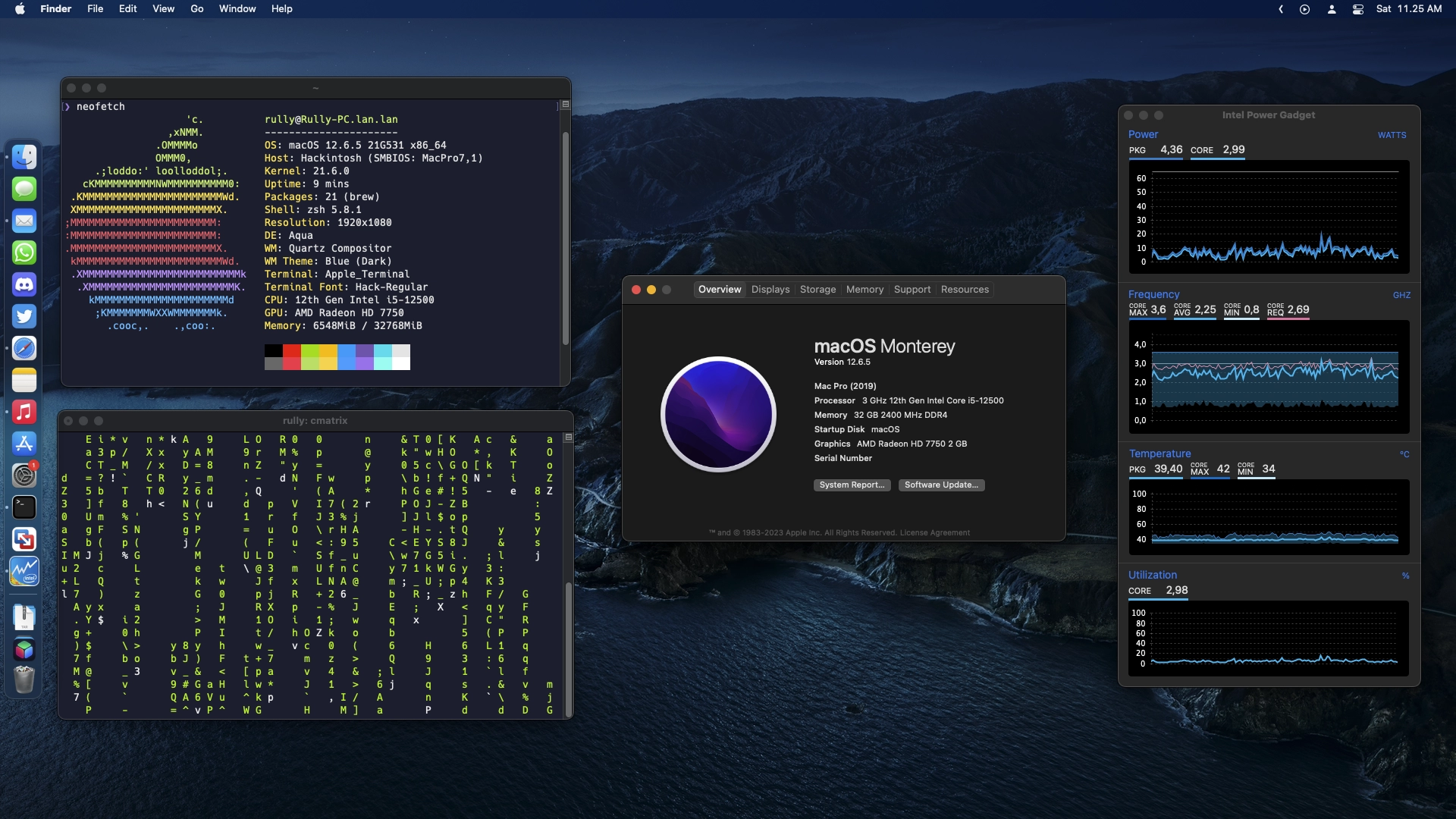
Bored with the same routine, and since I rarely play games anymore, I finally turned my daily driver PC into a Hackintosh PC. The processor I use is an Intel Core i5-12500, paired with a Gigabyte B660M DS3H DDR4 motherboard.
Since Intel 10th Gen is the last generation where the iGPU can work in macOS, I had no choice but to install a discrete GPU. For now, I’m using an AMD Radeon HD 7750, and planning to upgrade to an RX Vega 56 or RX 6600. The GPU I initially used was too ‘old’ to be paired with my motherboard. But with this tool, that’s no longer an issue.
Hardware Used
| Category | Item |
|---|---|
| Processor | Intel 12th Gen Core i5-12500 |
| Motherboard | Gigabyte B660M DS3H DDR4 |
| GPU | AMD HD 7750 2GB |
| RAM 1 | 2 X 8GB Kingston Fury Beast 3200MHz DDR4 |
| RAM 2 | 2 X 8GB Kllisre 2400MHz DDR4 |
| Boot Drive | Kingston NV2 500GB NVME Gen4 |
| Audio | Realtek ALC897 (ALC Layout ID 12) |
| Ethernet | Realtek RTL 8125 2.5GbE Controller |
| Bios Version | F22 |
What Works
| Feature | Status |
|---|---|
| CPU Power Management | 🟢 Working |
| Sleep / Wake | 🟡 Partial |
| GPU Acceleration (OpenCL & Metal) | 🟢 Working |
| Ethernet | 🟢 Working |
| Audio | 🟢 Working |
| Headset and Mic | 🟢 Working |
| Ethernet | 🟢 Working |
| iMessage/Facetime and App Store | 🟢 Working |
| AirDrop/Handoff | 🔴 Not Working |
BIOS Settings
Make sure to reset BIOS settings to default first.
Tweaker
- Advanced CPU Settings
- Hyper-Threading Technology → Enabled
Settings
- Platform Power
- Platform Power Management → Disabled
- Power Loading → Disabled
- IO Ports
- Initial Display Output → PCIe 1 Slot
- Internal Graphic → Disabled
- Above 4G Decoding → Enabled
- Above 4GB MMIO BIOS assigment → Enabled
- Re-Size BAR Support → Disabled
- IOAPIC 24-119 Entries → Enabled
- Super IO Configuration
- Serial Port → Disabled
- Parallel Port → Disabled
- USB Configuration
- Port 60/64 Emulation → Disabled
Boot
- Fast Boot → Disabled
- Windows 10 Features → Other OS
- CSM Support → Disabled
- Secure Boot → Disabled
USB Mapping
Since OS X 10.11 El Capitan, Apple has imposed a limit that the operating system can only use 15 USB ports, and this applies up to the latest version of macOS. Previously this could be overcome with the USBInjectAll kext, but unfortunately it can no longer be used on the last few versions of macOS.
The solution is to map which USB ports will be used and save them as a kext. Using USBToolBox, this mapping process can be done through Windows or Linux.
Test Results Using Geekbench 6
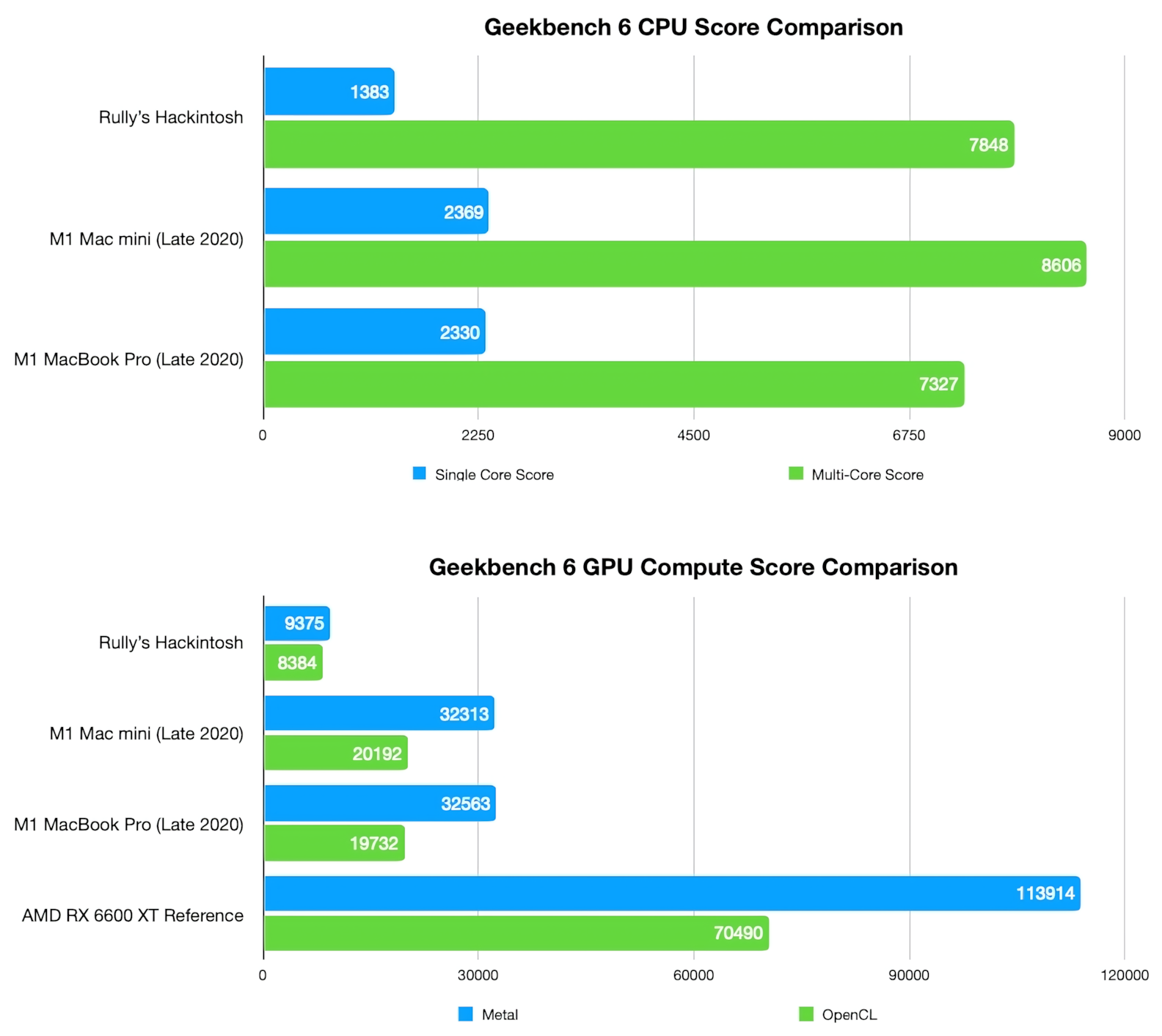
Using Geekbench 6 testing, it can be seen that the performance of the Hackintosh CPU I use is roughly equivalent to Apple devices using the M1 chip. Single core performance on x86 processors will look low, the explanation is here.
For GPU compute performance, my Hackintosh is far lower than devices with the M1 chip. But remember that I’m using a GPU released in 2012! If we include an AMD RX 6600 XT GPU in the comparison, then the M1 chip will easily lag behind.
However, keep in mind that although Hackintosh has the potential for greater raw performance than devices from Apple, real Apple devices will be more efficient and more power-saving, thanks to specialized accelerators like the T2 chip, neural engine, media engine, etc.
Example EFI Folder
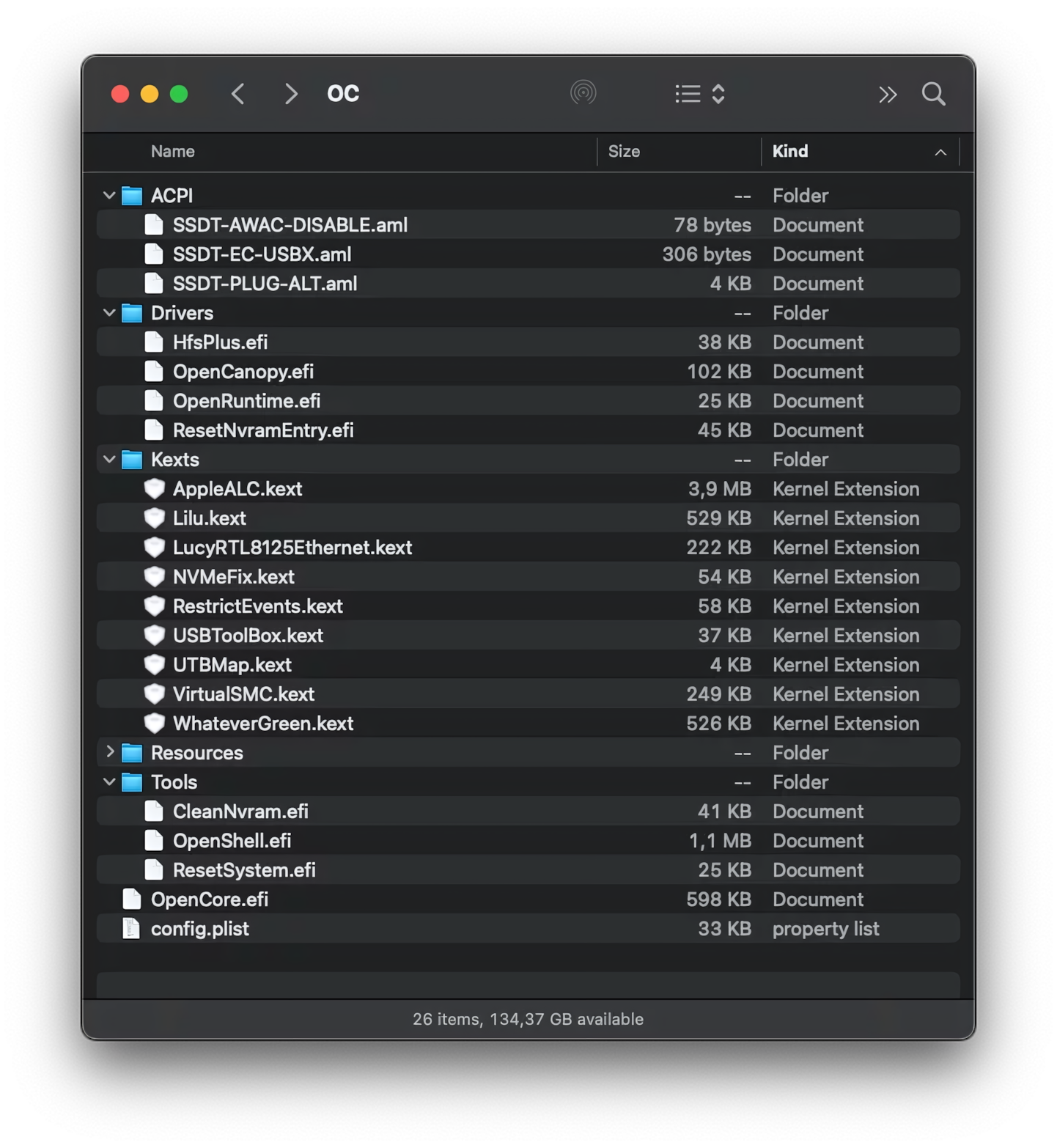
Using someone else’s EFI folder is usually not recommended even if both have identical hardware configurations. However, taking an EFI folder from a similar source as an example will simplify the Hackintosh installation process. Some files can be copied directly (e.g. drivers, SSDT, kext), but settings like config.plist must be adjusted according to each person’s hardware configuration and needs.
Here are some useful links:
- OpenCore EFI folder for Gigabyte B660M DS3H DD4
- Dortania OpenCore Install Guide
- OpenCore
- ProperTree (to edit
config.plistfile)
Update 2023/05/13:
I found the OpenCore Auxiliary Tool which has the same function as ProperTree (editing the
config.plistfile) but with a very easy-to-use GUI. In addition, this tool can also be used on Windows, Linux, and macOS.
Good luck! ✨