CPU Undervolt: Cooler and More Power Efficient
Apple recently released the ARM-based M1 and M2 series CPUs which are said to be more power efficient than CPUs from Intel and AMD. x86 CPUs made by Intel and AMD were indeed designed more towards performance than efficiency from the start. But there is one way to make x86 CPUs cooler and more power efficient, one of which is by undervolting. This time I will try to find the right undervolt recipe for the Intel Core i5-12500 CPU that I use as my daily driver.
Things to Note
x86 CPUs from Intel and AMD are known to be overvolted out of the factory. This is done to make their CPUs stable. Since more power is supplied to the CPU, its performance is more stable. In addition, the undervolt potential of one chip vs another is different, even from the same manufacturer and series. Use my experiment as a reference, not a fixed rule.
Please note that software or hardware damage that appears might void the warranty. I am not responsible for any damage that may occur. So be careful.
Methodology
Before undervolting the CPU, it’s a good idea to first record the metrics to be measured before the procedure is performed. Metrics measured include maximum Vcore voltage, maximum temperature, maximum CPU package power consumption, and initial performance score.
Maximum Vcore voltage can be taken using the CPU-Z tool when the CPU is at 100% usage. Maximum CPU package temperature and power consumption can be seen using Libre Hardware Monitor. Meanwhile, to find out the initial performance score, I use Cinebench R23.
Change Vcore mode to adaptive and set offset voltage
Undervolting can be done on non-K series Intel CPUs by changing the Vcore mode to adaptive with offset and setting the offset voltage to a negative value little by little until finding the sweet spot. Ryzen CPUs from AMD should be easier, because all AMD Ryzen CPUs are unlocked from the factory. For which settings to change, please check your motherboard’s manual, as each manufacturer has different names.
Every motherboard and CPU basically applies adaptive voltage, where the voltage given to the CPU will be high when the CPU frequency is high, and vice versa when the CPU frequency is low. By enabling adaptive with offset, we can lower the maximum and minimum Vcore values according to the negative offset we set.
I lowered the Vcore offset voltage by -0.010 V (10 mV) then rebooted.
Check measurement metrics, then lower offset voltage as needed
After lowering the offset voltage by -10 mV, I let the PC sit for 10 minutes so the CPU temperature stabilizes. After that, I ran the Cinebench R23 benchmark for 10 minutes, while measuring the maximum CPU package temperature and power consumption. After the benchmark finished, I recorded the metrics I wanted to measure.
Repeat lowering the offset voltage by -10 mV until the PC is felt to be unstable during the benchmark, or when the benchmark score results plunge downwards.
Measurement Results
| Max Vcore | Offset Voltage | Cinebench R23 Score | Max Temp | Max Power |
|---|---|---|---|---|
| 1.116 | 0.000 | 11,925 | 83.00 | 89.00 |
| 1.106 | -0.010 | 11,803 | 83.00 | 87.80 |
| 1.096 | -0.020 | 11,736 | 82.00 | 86.80 |
| 1.086 | -0.030 | 11,719 | 80.00 | 86.00 |
| 1.076 | -0.040 | 11,486 | 79.00 | 83.60 |
| 1.066 | -0.050 | 10,026 | 75.00 | 79.10 |
| 1.056 | -0.060 | 8,374 | 71.00 | 73.80 |
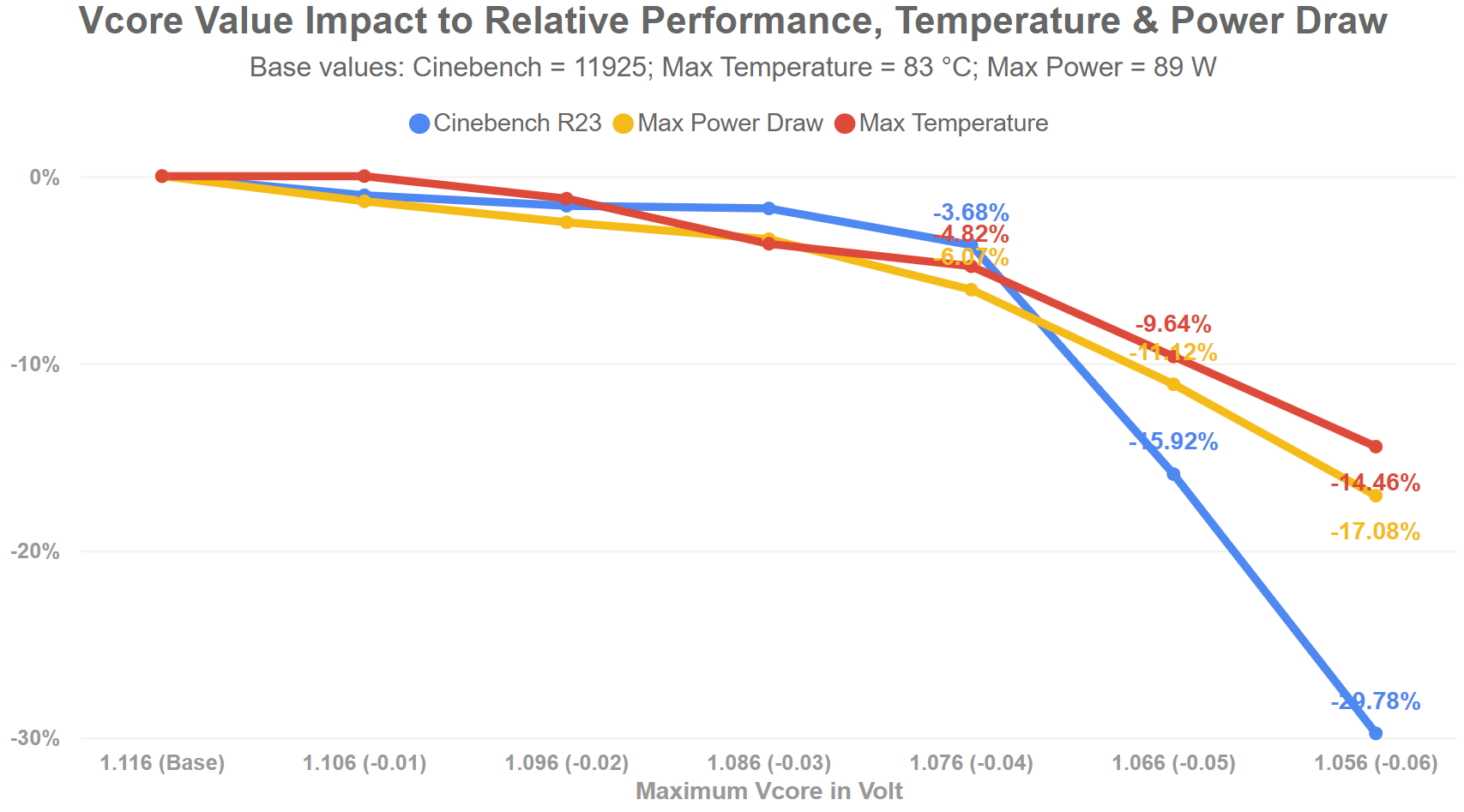
The interesting thing I found is that even though the offset voltage I lowered was very small, only -10 mV at a time, it had a direct impact on lowering the maximum temperature and power consumption of my CPU package. Even so, CPU performance also decreased. This was confirmed by the Cinebench R23 test results.
The sweet spot I got was when the offset voltage was at -0.40 V (40 mV). At that value, my CPU temperature dropped by 4.82% (from 83 °C to 79 °C), CPU power consumption dropped by 6.07% (from 89 W to 83.6 W), but the decrease in CPU performance was only 3.68%!
Setting the offset voltage lower than -0.40 V caused a very drastic drop in CPU performance, the effect of which was felt when the PC was being used. Therefore, for the CPU I use, a lower offset is not recommended.
Conclusion
Although it cannot match the power consumption efficiency of CPUs with ARM architecture, there is still room for x86 CPUs from Intel and AMD to be even cooler and more efficient.
Assuming the PC is used for work and is on for 9 hours a day, the potential savings in electricity costs in a month is approximately IDR 2,675, while in a year it can save IDR 32,100. It’s not a large amount, but savings that can be obtained for free should still be appreciated, right?